CI0: camera IP interface
The IP interface for serial cameras
The CY-CI0 puts serial cameras and equipment on an IP network. An RCP discovers the unit by its serial number, and the camera behind it joins the same workflow as the IP cameras already on the show.
For vision engineers, OB van integrators and rental houses running serial cameras on a wired IP gallery.
What the unit exposes
2x
Multi-protocol ports
1x
Ethernet 10/100
PoE+
Power in and out
20+
Catalogue cables

Power and control to a serial camera, over one network cable
A serial camera has no address on the network and no way to reach a control panel. The CI0 gives it both. One network cable brings PoE+ in, and the unit sends 12V and control back out to the camera.
It works with the Cyanview RCP control panel, which holds the camera protocols and drives the CI0 over the network. Nothing is configured on the unit itself.
Two multi-protocol ports, three on the CY-CI03P. The CY-CI0BM adds Blackmagic SDI control.
Plug it in and it appears
Put the CI0 and the RCP on the same local network and they discover each other. Add the camera in the configuration, pick the port you plugged it into, and the RCP configures the rest.
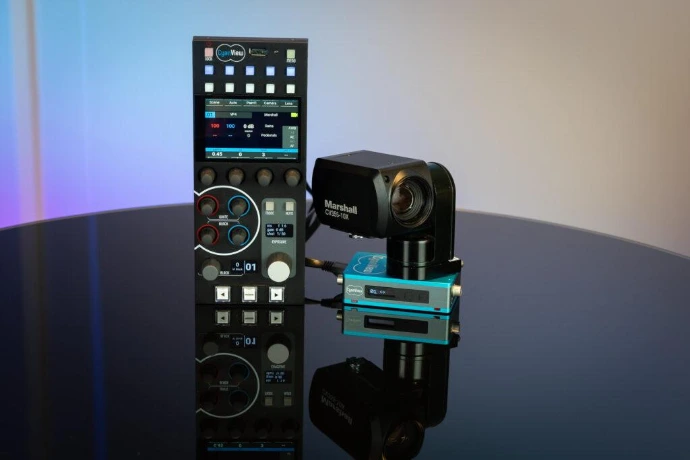
One CI0 takes a Marshall mini-camera on port 1 and a pan-tilt head on port 2, both powered and controlled from the same PoE run, and both appear on the RCP next to the IP cameras.
What the interface does
Six things the unit takes off your hands at the camera position.
One cable to the camera
A single connector and cable carries power and control to a mini-camera, instead of a separate run for each.
Several devices per port
Camera bus for selected protocols such as Dreamchip, IOI, Marshall and VISCA, so a chain of cameras shares one port.
Auto-discovery on the LAN
The RCP finds the unit by its serial number. There is no address to set and no configuration to carry from job to job.
Tally where there is none
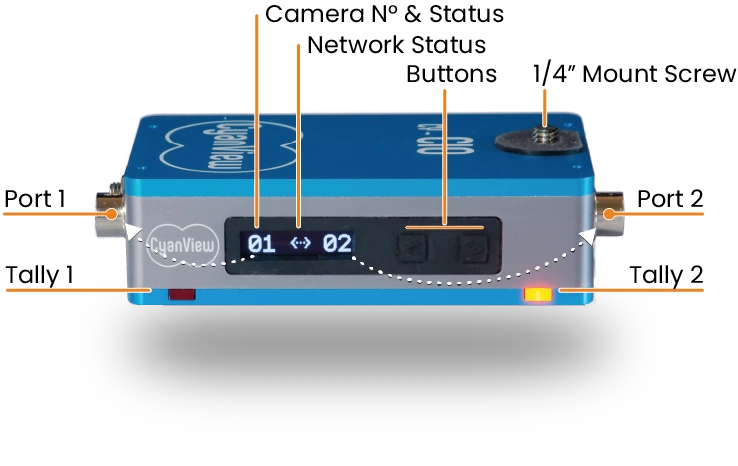
Two tally LEDs on the ports, which you can repurpose for any signalling. Mini-cameras and camcorders rarely ship with one.
Cables and pinouts
Custom cables for 20+ manufacturers, with every pinout published so an installation can be documented and repaired.
Mounts as one block
A 1/4 inch screw on top carries a mini-camera, so the camera and the interface travel and rig as a single unit.
Converts the following protocols
Two multi-protocol ports, and they are not identical. Check which port your camera needs before you wire the rig.
- RS232 / 422 / 485
- LANC (Sony and compatible)
- Sony Legacy (8-pin remote)
- Canon Cameras Serial Remote
- VISCA (Sony and compatible)
- S.BUS for gimbals and servos
- B4 lens protocols
- Blackmagic SDI Control (CI0-BM version)
| Port 1 | RS232, RS422, RS485, VISCA and B4 lens |
|---|---|
| Port 2 | The same, and adds LANC and S.BUS |
| Port 3 | S.BUS for a pan-tilt head, on the CY-CI03P |
| SDI control | Blackmagic cameras, on the CY-CI0BM version |
A LANC camera and an S.BUS gimbal both need port 2, so they cannot share one two-port unit. The supported list moves with firmware, and the current one lives in the integration notes, with cable pinouts.
What is on the unit
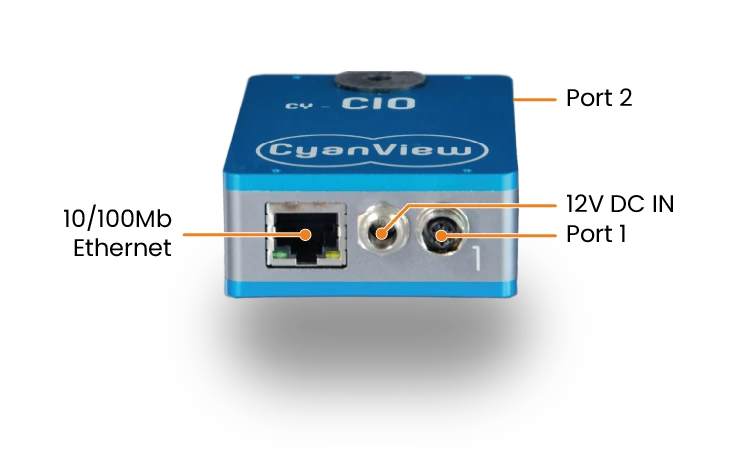
| Network | 10/100 Ethernet (RJ-45). Fast Ethernet only, so the switch port has to negotiate 100 Mbps. |
|---|---|
| Power in | PoE+ 802.3af/at, or DC 10-24V through a locking connector for battery and D-Tap |
| Power out | Regulated 12V 1A per port on PoE+. On DC the input voltage passes through unregulated, so check what the camera accepts. |
| Display | LCD showing the link between the RCP and the camera, with the camera number, IP and MAC on the buttons |
| Tally | Two LEDs on the ports, repurposable for any signalling |
| Mounting | 1/4"-20 UNC below for a tripod, 1/4"-20 UNC above to carry a mini-camera |
Integrations with most broadcast, box and mini-camera brands
These are the families that turn up most often on a CI0. The full list moves with firmware.











Marshall CV bodies, Sony FCB blocks, AJA RovoCam and Dreamchip ATOM ONE, over VISCA or LANC. Several can share one port on a VISCA bus.
Ikegami HDK bodies and Panasonic P2 cameras over RS422, Sony PXW-Z750 and VENICE 2 over the 8-pin serial interface.
Canon B4 and Cine-Servo, Fujinon Cabrio and ENG box lenses, cmotion digital lenses, and RS485 pan-tilt heads.
CI0 or RIO: which interface
Both sit next to the camera. The difference is what happens to control when the network does not cooperate.
CI0
The RCP holds the camera protocols, and the commands travel to the CI0 over the network. Control lasts as long as that network does, which on a short wired run is exactly what you want.
Ask for a quote- PoE+ powers the unit and the camera
- Two multi-protocol serial ports
- Auto-discovery on the local network
- The lower cost per camera position
RIO
The RIO carries the protocols itself, next to the camera, so it keeps driving the camera and the lens when the link goes. It costs more, and it is the right call on anything that is not a short wired run.
Compare the RIO- Holds the iris through a dropout
- USB mirrorless bodies
- Wi-Fi, cellular and IP mesh
- REMI gateway for remote production
A common build uses both: the CI0 fans the serial cameras out locally on a stable network, and a RIO sits between them and the internet.
Frequently asked questions
The questions that come up before a first CI0 goes on a job.
Not on its own. The CI0 has no protocol logic of its own, so control lasts as long as the network between it and the RCP. Latency and jitter break it before an outright drop does. For a remote production, put a RIO +WAN on site and let the CI0 fan the serial cameras out behind it on the local network.
The CI0 is a converter: the camera protocols run on the RCP and travel over the network. The RIO carries those protocols itself, next to the camera, and keeps driving the camera and lens when the link goes. The CI0 takes PoE+ and costs less; the RIO adds USB cameras, wireless links and the REMI gateway. Take a CI0 for a short wired run inside one venue.
Almost. Both carry RS232, RS422, RS485, VISCA and B4 lens control. Port 2 also carries LANC and S.BUS, so a LANC camera and an S.BUS gimbal cannot share one two-port unit. The three-port CY-CI03P adds a dedicated S.BUS port for a pan-tilt head.
No. It carries power and camera control. Video leaves the camera by its own SDI or HDMI output, on its own cable. The CY-CI0BM adds Blackmagic SDI control, which rides on the SDI signal, but that is still control and not video.
Yes, through the DC input, 10 to 24V. On DC the input voltage passes through to the camera ports unregulated, so a 16V D-Tap sends 16V to the camera. Check what the camera accepts before wiring it.
Not directly: one camera answers to one controller at a time. To give a second operator access, put a RIO in front and import the camera into the other RCP over REMI.
Power and full camera control over one network cable
Tell us the cameras, the ports and the network, and we will tell you what it takes.